Monday, December 22, 2014

Psiphon : Gain access to blocked sites


With Psiphon turn your computer into a proxy server that will connect the user or users you want to give access.

Psiphon will give access to all the blocked sites for the system as a whole. So no particular proxy browser is needed to surf.

Download and install Psiphon, Just run it .. and wait for the rotating refresh symbol to turn to Tick as in above picture.

Click here to download (For PC) : DOWNLOAD


Download for Android : Download

Saturday, December 13, 2014

TOR : Now bypass every Firewall


Tor Browser is a toolset that's designed for anyone who wants to improve their safety and security on the Internet. It can help you anonymize web browsing and publishing, instant messaging, and other applications that use the TCP protocol. For business users, it means that confidential exchanges of information can be kept from prying eyes and for more general users, it means that ISPs, keyloggers and other types of malware can't track your activities easily.
It works by bouncing traffic around a distributed network of servers which it calls "onion routers" (hence the logo). The Tor Browser interface allows you to easily toggle it on and off based on when you need to go online anonymously - there's no need to restart your computer when you've done so. If you want, you can also choose from various proxy tunnels based on a world map which displays exactly where each one is located.


Friday, September 12, 2014

Telegram : A messenger with many features


Telegram
 
Telegram Messenger is a Telegram client with a focus on speed and security. It’s superfast, simple and free.
 
With Telegram, you can create group chats with up to 200 people so you can stay connected with everyone at once.
 
Plus, you can share videos up to 1GB, send multiple photos from the web, and forward any media you receive in an instant.
 
All your messages are in the cloud, so you can easily access them from any of your devices.
 
Here's the complete update list for what's new
  • broadcast lists
  • voice messages in secret chats
  • pin to start for secret chats and broadcasts
  • delete profile photos
  • faster updating on start up
  • Send any files upto 1GB .
  • released a desktop version
While competing with Whatsapp (which do not have pc integration),They also released a desktop version which do not need further verification.(if once verifide in phone or pc) i.e. We can use Telegram both in PC and Mobile independently. 


Download Telegram for ur device :


Thursday, September 11, 2014

Direct download .apk files from google play store : Via APK downloader


Now download apk file for your apps from Google play store.

Steps to follow :


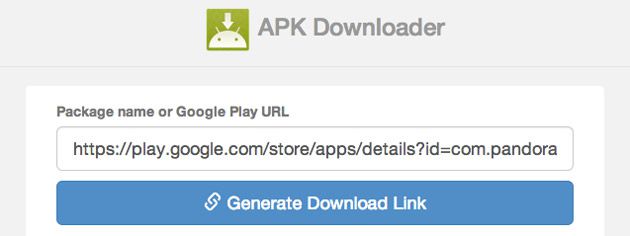
2) Paste  the Link for the app that you want to download from Google play (i.e Just go to the required app in the Play store and copy the address from the address bar).

3) Click GENERATE DOWNLOAD LINK.

4) Click the Download link and start downloading. Njoy...!


Dukto : Amazing file transfer software


Now transfer your files between any OS platform at very high transfer rate.

Dukto is an open source (totally free) software that enables data transfer between two systems that are connected to a  common WiFi or LAN .


Steps to follow : 

1) Install dukto in both devices.

2) Connect both devices with a LAN or common WiFi ( or  create a  hotspot and connect)

3) Open Dukto in both devices. And you can see all the connected devices

4) Drag and drop or browse for the files to transfer.


Click Here to download :

Dukto for PC (Windows XP/Vista/7/8) : DOWNLOAD

Dukto for PC (Mac) : DOWNLOAD

Dukto for PC (Linux) : DOWNLOAD

Dukkto for Symbian (Qt is included, install that too) : DOWNLOAD

Dukto for Android : DOWNLOAD

Saturday, August 16, 2014

Auto change your Desktop Background : John's Background Switcher

Fed up by seeing same desktop background every day? Most probably everyone would have thought of a software that might download and customize the desktop with our favorite wallpaper whenever necessary. 
So here is one such soft, that will do even more than we think.


Johns Background Switcher


Version: 4.9
Author: John Conners
Supporting OS : 
Win 98
Win 2000
Win Me
Win XP
Win 2003 Server
Windows Vista
Win 2008 Server
Windows 7
Windows 8

Size: 2.1 MByte , Freeware

  • You can create lists of specific pictures on your computer.
  • You can point it at folders on your computer, such as 'My Pictures' and it will select random pictures from there.
  • You can use Google Image Search results.
  • Can point instagram pics.
  • Want to choose from the best public domain images? Use Pixabay!
  • Can use stored photos in Dropbox.  
and much more...

Thursday, August 14, 2014

Earn Money and Recharge Online - Way2Sms.com


How to earn Money? - Follow these simple steps------------------------------------------------------------1: Login to Way2sms site. If you haven't yet registered. Register your account First : Click to register
2: There are several exciting ways in which you can earn your first recharge

Register & Win
Register with our sponsors & get upto Rs. 8 daily.
 
Download Mobile Apps
Download some cool apps & earn upto Rs. 8 daily.
 
Invite Friends & win
Earn unlimited recharge everyday by inviting.
 
Sign-up & earn
Signup with our sponsors & earn Rs. 1 daily.
 
Fill Surveys & win
Fill some interesting surveys to get upto Rs. 3 daily.
 
Login to Gmail & Yahoo!
Assured 5paisa everyday when you login to Gmail & Yahoo!

Saturday, August 9, 2014

Play games and Win Recharge - Via Laaptu.com


Play Quiz and earn 10RS at once : click HERE PLAY QUIZ

Click Here and Register : www.Laaptu.com

You can earn money by the following actions:


ACTIONEARNINGS
Joining bonusRs 2
Daily login10 paisa daily
Math QuizUpto 78 paisa daily
Fun QuizUpto 78 paisa daily
Quiz ContestUpto Rs. 10 in every Quiz Contest
Inviting friendsUpto Rs. 2 per friend who joins

How to register and start earning??

It is Simple : follow the steps,

Click here : www.Laaptu.com  to go to official website of laaptu.

  • Click JOIN NOW and you will reach to the signup page.
  • Fill the details and Click signup Now.
  • Simple :)
You can see your earnings when you login and Once you have at least Rs. 10 in your account. You can get a Free Recharge instantly. 

Friday, August 8, 2014

Earn Money and Recharge - From Fullonbids.com


1. Register and create an account. You will receive unlimited free bids and it won’t cost you anything at all. Nothing to lose!
2. Select a product for which you wish to bid. Try to enter a unique and lowest bid for winning. During the auction, you can bid as many times as you want.
3. All the users can place as many bids as they want; as said before you get unlimited bids.
4. Post closing of an auction, if your bid is unique and lowest, you will be announced as a winner for that particular product and you will get it absolutely FREE!!! Simply, click on "Prize List" and claim.
5. If there isn’t any single unique bid then the winner is determined by the lowest and fastest bid. Where two or more unique bids have been quoted and one whoever bids first and the lowest, wins. The process keeps on repeating till the winner is decided.
TO WIN, PLACE A UNIQUE AND LOWEST BID!!!


What is Rewards? How to earn on FullOnBids ?


Send Sms-Earn Free Mobile Recharges - Ultoo.com

Follow the Procedure- its simple :

Click Here & Register : www.Ultoo.com 

Now you reach the official website of Ultoo
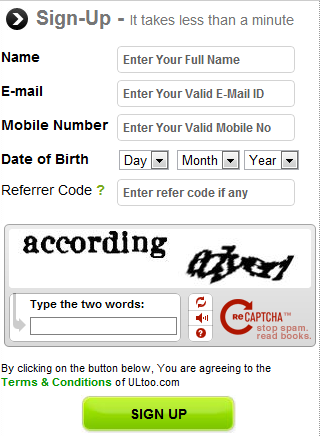
  • Each person have to sign up from the official website page of Ultoo.
  • For signing up you have put all the necessary information including name, email and phone number in the registration form.
  • After that, log in into your account and start using it.

How do they earn?? : They earn their money by displaying the adds as we enter in to the site. But why we should bother if they provide us with some money?

What we get ???

  • For successful Registration Rs 2.
  • For email verification Rs 1(first time only).
  • For sending sms 2 paisa/sms.
  • For inviting friends(through SMS)Rs 1.
  • For inviting friends(through email)Rs 1.
How to recharge?


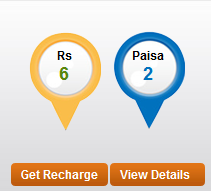
  • You can see something like the above picture as you login to your account.
  • When the count reaches RS : 10 or above, you can click on "GET Recharge".
  • Your Mobile Number or any other given number can be recharged with that amount.
  • Very Simple :)


Click Here & Register : www.Ultoo.com 

Monday, July 28, 2014

Useful Tools - Power Menu 1.51


It is a powerful tool with which adds,
“Always On Top”,
 “Transparency” and
 “Minimize To Tray”
functions to the windows control menu..

ie, Right click on any window and u can make it “Always On Top” or add Transparency or Minimize To Tray .

Developer : 
Thong (Tum) Nguyen
Size: 149 KB
License: Freeware
Requires: Win 9x/ME/2K/XP


Click to Download : DOWNLOAD


Sunday, July 27, 2014

Confused after a Fresh Windows installation???

Most probably there will be a confusion among many,after a fresh installation of  Windows OS.
What all should be installed??!!
Here,let me suggest some useful softwares that are relay necessary and essential...!


1) AntiVirus :  
www.technoEssentia.blogspot.com

First and foremost thing that we require is any antivirus software. Install one, before you get into further procedure...

I would personally suggest AVAST because its available for free and I've been using it for years..

Click to Download : DOWNLOAD


2) WinRar :

www.technoEssentia.blogspot.com

WinRAR is a powerful archive manager. It can backup your data and reduce the size of email attachments, decompress RARZIP and other files downloaded from Internet and create new archives in RAR and ZIP file format.

Click to Download : DOWNLOAD


3) MediaPlayer :

VLC is a free and open source cross-platform multimedia player and framework that plays most multimedia files as well as DVDs, Audio CDs, VCDs, and various streaming protocols.
I recommend VLC because it is simple and powerfull.

Click to Download : DOWNLOAD


4) PDF Reader


Foxit reader is the one that I would suggest first. It is Fast,Simple,Small in size and doesn't use system resources heavily.

Click to Download : DOWNLOAD


5) Browser :  


A free browser based on Google Chrome. I prefer this one more than chrome. It is fast,especially when dealing with slow network and any extension can be installed directly.

Click to Download : DOWNLOAD